Key Takeaways
A wedding day binder is the single master document that runs the entire wedding day, consolidating printed timelines, contact lists, floor plans, and emergency protocols in one physical location. By consolidating all planning information in one place, a wedding day binder reduces stress and prevents missed deadlines throughout the planning process.
Couples and planners should finalize and print their binder 2–4 weeks before the wedding date, then share copies or PDFs with vendors and VIPs for seamless coordination. The binder can be physical or digital (for example, stored in Google Drive), and is often managed by a coordinator or trusted friend to ensure accessibility and organization.
Essential sections include: detailed wedding day timeline, vendor contacts, signed contracts, ceremony and reception details, guest list snapshots, checklists, and logistics information. For effective organization, use clear sheet protectors, zipper pouches, and tabbed dividers for categories like 'Ceremony,' 'Reception,' and 'Contacts.'
This article provides sample schedules with specific times, layout suggestions, and a FAQ section to address common binder questions for both DIY couples and professional planners. Including a perfect timeline and a sample wedding timeline helps ensure all activities are coordinated smoothly and provides a valuable reference for planning.
eydn makes building your binder faster — export your timeline, vendor contacts, guest list, and seating details directly from your dashboard rather than hunting across spreadsheets and email threads.
Introduction: What Is a "Wedding Day Binder" and Why It Matters
Picture this: it's June 13, 2026, at a Boston venue. The coordinator walks in at 7:00 a.m., carrying a three-ring wedding-day binder. Inside? Every detail needed from hair and makeup through the 11:00 p.m. sparkler exit. No scrolling through apps. No hunting for emails. Just flip, find, execute.
A wedding day of binder is the physical — and optionally digital — master organizer for everything happening on the big day. Unlike a generic wedding planning notebook that tracks vendor research and budget spreadsheets over months, this binder is specifically curated for the wedding weekend, especially the wedding day itself.
Think of it as a printed snapshot of everything you've planned. Tools like eydn keep your planning organized digitally throughout the process; the binder is what you print, distribute, and hand to vendors when you need something that doesn't depend on Wi-Fi or battery life.
This article provides a section-by-section outline of what to include, when to finalize, and how to present it clearly to vendors, VIP guests, and anyone helping run the day.
When to Build and Finalize Your Wedding Day Binder
Start assembling the binder around 12–8 weeks before the wedding date, once your ceremony venue, caterer, and photographer are on your confirmed vendor list. Creating your own timeline early in the planning process and customizing it to your needs is essential to ensure all elements of your wedding day run smoothly.
Here are concrete timing milestones:
8 weeks out: draft a rough wedding day timeline and binder structure. Confirm which sections you need based on your planning process.
4 weeks out: complete a near-final timeline with all vendor details populated. Double-check contracts and contact information.
2 weeks out: finalize all timelines and vendor details. Export and print PDFs for the final binder.
1 week out: distribute simplified one-page timelines to wedding party members and immediate family.
Reviewing your wedding planning binder once a week helps keep you on track with your planning process.
For legal items, such as the marriage license, start checking the requirements 60 days before your wedding. States like Oregon and Washington have a 3-day waiting period after application, and licenses expire after 60 days — missing these windows affects 5–10% of couples according to planner surveys.
If you’re using Eydn throughout planning, most of the content for your binder — timeline, vendor contacts, guest list snapshot, seating summary — is already organized and ready to export when these milestones arrive. Bringing your wedding planning binder to key meetings ensures you have all the necessary information at hand.
A well-organized wedding planning binder can help reduce stress and improve communication with vendors and family.
Core Sections Every Wedding Day Binder Should Include
The binder should be divided by clearly labeled tabs or color-coded sections. Think of it as a reference document that anyone can navigate under pressure.
Essential sections include:
Master wedding day timeline (from wake-up through vendor load-out)
Vendor directory and emergency contacts
Signed contracts, invoices, and payment status summaries
Ceremony details (script, processional order, music cues)
Reception details (run-of-show, seating, floor plan, décor notes)
Guest list, RSVP summary, and dietary notes
Checklists (packing, décor inventory, morning-of, end-of-night)
Legal and logistics info (marriage license, parking, shuttle schedules, hotel blocks)
Each section has a clear purpose. Each tab solves a specific problem. The goal is that anyone — your coordinator, a trusted family member, a vendor — can pick up this binder and find what they need in under 60 seconds.
Master Wedding Day Timeline Tab
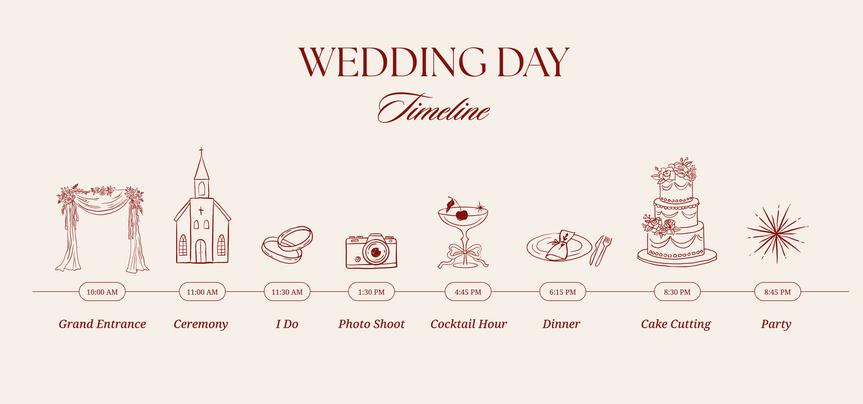
This tab holds the detailed, minute-by-minute wedding schedule. The master timeline includes a minute-by-minute plan from hair and makeup to the final exit, ensuring all key events are accounted for and everyone is aligned. A well-structured wedding timeline is essential for coordinating the day’s events, eliminating confusion, and avoiding scheduling conflicts. Finalizing your wedding day timeline about a month before the date allows enough time to share details with vendors and VIPs. The level of detail in your timeline can vary depending on the audience—vendors need more specifics, while guests require only the essentials.
Here’s a sample timeline based on a Saturday, September 12, 2026 wedding in Portland, Oregon, with a 5:30 p.m. — ceremony starts:
Morning Preparation
8:00 a.m. — couple wakes up; light breakfast
9:30 a.m. — hair and makeup artists arrive at hotel suite; steam wedding attire
11:00 a.m. — photographer arrives for flat-lay detail shots (invitation suite, rings, wedding dress)
Afternoon Getting Ready
1:30 p.m. — bridal party fully dressed; personal flowers delivered
2:15 p.m. — couple gets into wedding attire; individual portraits begin
3:15 p.m. — first look and couple portraits at nearby garden
4:00 p.m. — wedding party and family portraits
Ceremony and Reception
5:00 p.m. — guests start arriving; prelude music; ushers greet guests
5:30 p.m. — ceremony starts
5:30–6:00 p.m. — ceremony (vows, processional, recessional; a typical wedding ceremony lasts up to 30 minutes, or up to an hour for a full Catholic Mass)
6:00–7:00 p.m. — cocktail hour; extended family photos and sunset portraits
After the ceremony and cocktail hour, schedule post-ceremony photos to capture any remaining group shots or special moments, ensuring they fit into the timeline without interfering with the reception.
7:15 p.m. — guests seated; grand entrance and first dance
7:30–8:30 p.m. — dinner service and toasts (maid of honor, best man)
8:45 p.m. — parent dances; open dance floor begins
9:45 p.m. — cake cutting and dessert
10:50 p.m. — last dance
11:00 p.m. — sparkler exit; after-party optional
11:15 p.m.–12:15 a.m. — vendor load-out and venue reset
Key Events to Include in Your Timeline
Getting ready
First look
Ceremony starts
Cocktail hour
Post ceremony photos
Dinner and toasts
Parent dances
Cake cutting
Last dance
Final exit
Planning Notes
Allocate specific time blocks for travel, ceremony, and reception activities to keep the day on track. Include buffer times of 10–15 minutes around the ceremony and any travel between locations to account for distractions and delays. Flag “no-slip” moments like ceremony start and dinner service—these are your critical path items that everything else bends around. Include all vendor arrival times in your timeline for smooth coordination. A typical wedding day lasts five to six hours from start to finish, with most receptions running four to five hours.
Share the finalized timeline with all VIPs and wedding party members so everyone knows their roles and responsibilities. Send a customized timeline to every person identified as a 'Wedding VIP' before the wedding day, and provide the final timeline to all vendors two weeks before the wedding date. Having a detailed wedding day timeline helps ensure everyone is on the same page, eliminates confusion, and helps avoid mistakes like missing payment deadlines or forgetting a final walkthrough.
eydn’s timeline builder lets you draft and adjust this schedule throughout planning, then export a print-ready version for the binder when you’re ready to finalize.
Vendor Directory and Communication Tab
This tab provides an at-a-glance directory with every vendor and key VIP contact, designed for quick lookups when time is tight. The wedding coordinator (or planner) is a critical point person who helps coordinate the timeline and vendor activities on the wedding day.
Include these vendor categories:
Wedding planner or day-of coordinator (mobile number plus backup contact)
Venue manager and after-hours emergency line
Catering company and on-site banquet captain
Photographer and videographer with shot list preferences
Florist and décor team lead
Band, DJ, or string quartet with lead performer and tech contact
Rental company for tents, chairs, linens, and serviceware
Transportation providers (shuttle schedules, classic car driver, rideshare codes)
Officiant and ceremony musicians
Your wedding planning binder should contain a vendor contact list with payment due dates. Vendor schedules in the binder should also include arrival and departure times for key professionals, such as florists and photographers.
For emergency contacts, add local taxi companies, towing services, and the nearest urgent care or hospital. Medical emergencies impact roughly 5% of weddings, according to planner reports — this tab is not optional. Vendor schedules should include arrival and departure times for all key professionals to ensure smooth coordination.
eydn stores all your vendor details — contact info, contracts, payment status — in one place throughout planning. When it’s time to build this tab, it’s about exporting rather than hunting through email.
Contracts, Invoices, and Budget Snapshot Tab
This tab isn’t about comprehensive financial planning — it’s about having critical documents readily available on the wedding day to resolve disputes or confusion quickly. A wedding planning binder should include a wedding budget to track payments and expenses. It should also include a vendor contact list with payment due dates, as well as signed contracts and invoices for easy reference.
Include:
Printed copies of all signed contracts (venue, caterer, bar, photographer, entertainment, florist, rentals, transportation)
Latest invoices and receipts marked “paid,” “due at event,” or “overdue”
A one-page budget snapshot summarizing total spend, remaining balances, and gratuity plan — pre-calculated tip envelopes save 10–15% of end-of-night delays
Vendor contact list with payment due dates
Signed contracts and invoices for easy reference
Real examples this tab resolves:
Confirming bar package hours (e.g., reception bar contracted 6:00–10:00 p.m.)
Verifying whether late-night snacks were included (prevents surprise charges averaging $500)
Resolving final details on rental pickup times
Keep explanations concise. This is a reference tool, not a planning document. Eydn’s budget tracker keeps a running record of what’s paid and what’s outstanding, so your one-page snapshot is always current and easy to pull.
Ceremony and Reception Details Tabs

Ceremony Tab
Processional order with names (e.g., 4 bridesmaids, 4 groomsmen, 1 ring bearer, 1 flower girl)
Exact song cues and who controls playback (DJ, live musician, venue AV)
Printed ceremony script or outline (vows, readings, unity ritual timing)
Specify the exact moment during the ceremony when the couple will exchange vows in front of their guests.
Ensure wedding bands are included in the ceremony details and assigned to the appropriate person for safekeeping and handoff.
Front-row seating notes addressing family dynamics (e.g., divorced parents' seating arrangement)
License signing plan: when, who must be present, and location
Reception Tab
Run-of-show with rough times: grand entrance, first dance, toasts, cake cutting, bouquet toss, last dance
Printed floor plan showing table layout, dance floor, cake table, DJ booth, gift table, photo booth areas
Seating plan references: table numbers, VIP tables, accessible seating, high chairs
Music notes: do-not-play list and special songs (father–daughter dance, mother–son dance, last dance)
Include a mood board and design details in the binder to help visualize the wedding theme and guide decor decisions.
Guest List, RSVPs, and Seating Overview Tab
While detailed guest management lives in your planning app, the binder should carry a snapshot usable offline. Wi-Fi failures occur in 40% of venues — this tab exists for exactly that reason.
Include:
Master alphabetical guest list with attendance status (accepted, declined, no response) as of one week prior
Table-by-table seating summary: table numbers, guest names, critical notes
Quick headcount summary: adults, children, vendor meals, total headcount for catering
Example note format: "Table 3: Johnson family — nut allergy, gluten-free, seat near exit for toddler with family member supervision"
Keep layouts as single-page or two-page spreads for quick reference. eydn's guest list and seating tools let you generate exactly this kind of printable snapshot — filtered, sorted, and formatted — without manually rebuilding it from a raw spreadsheet.
Checklists, Packing Lists, and Décor Inventory Tab
This is your safety net tab — preventing forgotten items and misplaced décor on the morning-of and at the end of the night.
Morning-Of Packing List
Wedding rings and bands
Vow books
Marriage license (or license instructions)
Emergency kit (sewing kit, bobby pins, stain remover, pain relievers)
Personal items stored elsewhere
Décor and Signage Inventory
Number of table numbers, candles, vases
Signage pieces (welcome sign, bar menu, seating chart boards)
Placement locations at venue
End-of-Night Retrieval Checklist
Gifts and card box
Leftover cake for couple
Centerpieces couple is keeping
Rented items (e.g., "24 gold votive holders to return to rental company")
Personal décor (e.g., "1 custom neon sign goes home with couple's parents")
Not sure if you've covered everything? eydn's AI assistant can review your checklist against your vendor list and flag anything that looks missing before you finalize the binder.
Logistics, Legal, and Emergency Information Tab
This tab holds all the non-romantic but essential details that keep the day running legally and smoothly.
Transportation Shuttle pickup times and locations, return shuttles, and rideshare codes.
Parking Lot maps and access codes for vendors and guests.
Hotel Blocks Hotel names, addresses, check-in times, and group reservation contacts.
Marriage License: Issuing county, waiting periods, expiration date, and filing responsibility post-ceremony.
Weather Contingency: Plan for moving an outdoor ceremony indoors, tent backup plans, and a clear decision maker with a firm deadline (e.g., 11:00 a.m. day-of decision).
Medical and Safety: Nearest urgent care or emergency room, venue emergency exits, and severe allergies among VIP guests.
This tab is often overlooked but critical in real emergencies. Having it printed and tabbed means no one is Googling "nearest hospital" while trying to manage a situation.
Honeymoon Plans and Post-Wedding Essentials Tab
The excitement of your wedding day doesn’t end when the last dance is over—your honeymoon and post-wedding plans are the next chapter. Including a dedicated tab for honeymoon plans and post-wedding essentials in your wedding binder ensures a smooth transition from the main event to your well-deserved getaway and beyond.
Start by outlining your honeymoon details: destination, travel dates, flight information, hotel reservations, and any pre-booked activities. Create a day-by-day itinerary, but leave space for spontaneous adventures and relaxation—after all, this is your time to unwind after months of wedding planning. Create a comprehensive packing list that includes essentials such as passports, travel insurance, chargers, and any special attire or gear needed for your destination. If your wedding weekend involves travel for your wedding party or close family, include recommended accommodations, local attractions, and travel tips to help everyone make the most of their stay.
Don’t forget the important post-wedding tasks that keep life running smoothly after the celebration. Add a checklist for changing your last name, updating identification documents, and sending thank-you notes to guests and wedding vendors. This is also the place to track follow-up actions with your photographer or videographer, such as reviewing proofs or finalizing your wedding album. Keeping these details in your binder means you won’t lose track of anything in the post-wedding whirlwind.
If you’re planning a brunch or casual gathering with your wedding party or close family the day after the wedding, include those details here as well. List contact information for key family members and friends so you can easily coordinate any post-wedding events or stay in touch during your honeymoon. By organizing your honeymoon plans and post-wedding essentials in one place, you’ll be able to fully enjoy your wedding day and the adventures that follow, knowing every detail is accounted for and everyone is on the same page.
Design, Branding, and Digital Versions of the Binder
For a polished result, your binder should be visually consistent and easy to navigate at a glance. A wedding day binder can be physical or digital and is often managed by a coordinator or trusted friend.
Visual Consistency: Choose consistent fonts and colors throughout. Create a cover page — “Wedding Day Binder – Olivia & Daniel – June 13, 2026 – Boston, MA” — and maintain both a physical three-ring binder and a digital PDF copy stored in a shared drive.
File Naming: Use clear, descriptive names: “Smith-Wedding-Day-Timeline-2026-09-12.pdf” and “Vendor-Contacts-Portland-2026.pdf.” This matters when vendors are opening files on their phones the morning of the wedding.
Digital Distribution: Share a PDF version with key vendors 1–2 weeks before the wedding. Use password-protected links for any content that contains financial details or private contact information. Google Drive is a popular option for storing and sharing the digital version of your wedding-day binder, making it easily accessible to everyone involved. Eydn’s vendor management tools make it easy to share role-specific information with each vendor without exposing details they don’t need.
After the wedding, your binder—whether physical or digital—can serve as a keepsake that holds memories, photos, and notes from the planning process.
How to Use the Binder on the Wedding Day
Assembling the binder is half the job. Using it effectively is the other half.
Who Holds the Binder? The lead planner or coordinator keeps the master. A backup copy goes with an assistant or trusted family member — essential for DIY couples without a professional coordinator.
Briefing VIPs: Walk through the simplified one-page timeline at the rehearsal. Email or hand out abbreviated versions to the wedding party so everyone knows their role and timing without needing access to the full document.
Day-Of Rhythms: Check the binder at natural breaks: after hair and makeup, before ceremony line-up, before reception formalities. Confirm next steps against the wedding itinerary rather than relying on memory.
Logging Changes: Use quick handwritten notes or sticky flags for time shifts (e.g., toasts pushed from 7:35 to 7:45 p.m.). Small adjustments are inevitable — capture them so the whole team stays aligned.
End-of-Night Handoff: Review the end-of-night checklist before leaving the venue. Sign off with the venue manager and confirm all rented items, personal décor, and gifts have been accounted for.
FAQ

How many copies of the wedding day binder should we have?
Have at least two physical copies: one master for the lead planner or day-of coordinator, and one backup for an assistant or trusted family member. Keep one digital copy in a shared drive and share a PDF with key vendors 1–2 weeks before the wedding. For digital sharing and easy collaboration, consider using Google Drive to ensure everyone has access to the latest version. eydn stores your planning documents centrally, making it easy to export and share the right version with the right people at the right time.
Do we still need a binder if we’re using a wedding planning app?
Yes — and they work best together. Apps excel at planning and communication throughout the process, but Wi-Fi and battery issues on-site make a physical binder a reliable backup. The smart approach is to use Eydn throughout planning to stay organized, then export your timeline, vendor contacts, and guest snapshot into a printed binder for the day itself. Digital systems supported by printed run sheets are the most resilient combination.
What size and format should the wedding day binder be?
Use a sturdy three-ring binder in US letter size (8.5 x 11 inches) with a spine label showing the couple’s name and wedding date. Add plastic sheet protectors for contracts and floor plans, and tabbed dividers for each major section. Color-coded tabs make navigation faster under pressure and help keep everything organized. For planners, a neutral branded binder style reusable across multiple weddings with custom covers is worth the investment.
Who should have access to the full binder rather than the abbreviated versions?
The full binder is for the planner, coordinator, and venue manager — it contains contracts, budget notes, and private contact numbers that don’t need to circulate widely. Distribute abbreviated versions to the wedding party (simplified timeline and responsibilities), immediate family (ceremony timing and portrait schedule), and vendors (role-specific run sheets only). Eydn’s sharing settings let you control exactly which details go to which people digitally, mirroring the same logic for the printed version.
Can the binder help if something goes wrong on the day?
Absolutely — that’s one of its core functions. The vendor directory resolves “who do I call?” in seconds. The contracts tab resolves disputes about what was agreed. The logistics tab covers medical emergencies, weather contingencies, and transportation issues. The checklists ensure nothing gets left behind at the end of the night. A wedding planning binder can help keep vendor information, timelines, and checklists organized, making it an essential tool for managing unexpected issues. A well-built binder turns potential chaos into a manageable problem with a clear next step.
What if we’re working with a planner?
If you’re working with a full-service planner, they will manage all aspects of wedding planning, including organization, timelines, vendor coordination, and strategic guidance. They typically maintain and update the wedding day binder for you, ensuring every detail is covered and accessible when needed.
Conclusion: Wrapping Up Your Perfect Wedding Day Binder
Bringing your wedding day binder together is one of the most important steps in the entire planning process. This single resource keeps your wedding party, vendors, and family aligned, ensuring that every detail—from the ceremony venue to the final timeline—is accounted for and easily accessible. Whether you’re working with a professional wedding planner or managing the details yourself, your binder is the go-to guide that transforms months of planning into a seamless, stress-free wedding day.
As you approach your big day, take time to double-check every section of your binder. Review your wedding day timeline, confirm that all vendor contracts and payments are up to date, and make sure your guest list and seating arrangements reflect the latest RSVPs. Share the final timeline and key details with your wedding party, immediate family, and vendors so everyone is on the same page and ready to execute your vision.
Remember, the wedding day binder isn’t just about logistics—it’s about peace of mind. With all your plans, contacts, and final details organized in one place, you can focus on what matters most: celebrating with your loved ones and enjoying every moment of your wedding day. From the first look to the last dance, your binder will be by your side, guiding you through each step and helping you handle any surprises with confidence.
As you look forward to your honeymoon and the start of your new life together, know that the effort you’ve put into planning and organizing will pay off in a truly memorable celebration. With your wedding day binder complete, you’re ready to embrace the joy of your wedding, knowing that every detail—big and small—has been thoughtfully planned.